B637-BK Custom Printed Mega Multi Compartment Lunch Box, Personalized Insulated Lunch Bag with Logo
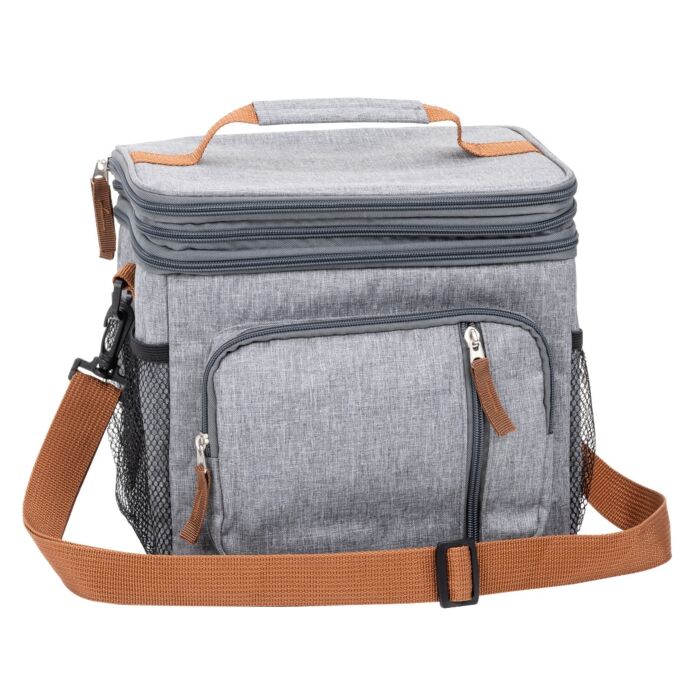
Custom Printed Mega Multi Compartment Lunch Box
Keep meals organized while promoting your brand with the Custom Printed Mega Multi Compartment Lunch Box, a spacious and practical promotional lunch bag designed for employees, corporate gifts, outdoor activities, and everyday use.
Made from durable polyester with a PEVA-lined interior, this versatile lunch box provides generous storage space for packed lunches, snacks, beverages, and everyday essentials. Its multi-compartment design makes it easy to organize meals and personal items, making it an excellent choice for commuting, workplace lunches, picnics, and travel.
The Mega Lunch Box features a large main zippered compartment, a convenient top zippered lid compartment, and a front zippered pouch for smaller accessories. Two side mesh pockets provide additional storage for water bottles and other essentials.
Designed for convenience and portability, this promotional lunch bag includes a removable shoulder strap, offering a comfortable carrying option for busy professionals and people on the go.
Available in Black and Grey, the Mega Multi Compartment Lunch Box can be personalized with your company logo, business name, or custom artwork using screen printing or digital heat transfer. Its generous size and practical features make it an attractive promotional product that customers and employees can use regularly.
Instant Quote
Ready after selected options
Plus applicable taxes
Plus applicable taxes. Quote updates if options change.
In stock
Pricing
25 - 74
Qty (Coloured) $23.65
75 - 199
Qty (Coloured) $21.84
200 - 349
Qty (Coloured) $20.85
350 - and more
Qty (Coloured) $20.25
| Qty | 25 - 74 | 75 - 199 | 200 - 349 | 350 - and more |
|---|---|---|---|---|
| Qty (Coloured) | ||||
| Price each | $23.65 | $21.84 | $20.85 | $20.25 |
| Setup charges | $35.00 | $35.00 | $35.00 | $35.00 |
| Additional location add | $2.00 | $1.75 | $1.50 | $1.00 |
| Each additional colour | $0.75 | $0.25 | $0.25 | $0.15 |
-
Product: Mega Multi Compartment Lunch Box
-
Product Code: B637
-
Material: Polyester
-
Interior: PEVA lining
-
Product Size: 11" W x 9.75" H x 7.48" D
-
Available Colours: Black and Grey
-
Main Compartment: Large zippered storage compartment
-
Top Compartment: Zippered lid compartment
-
Front Pocket: Convenient zippered pouch
-
Side Storage: Two mesh pockets
-
Shoulder Strap: Removable for convenient carrying
-
Customization: Screen Printing or Digital Heat Transfer
-
Minimum Listed Quantity: 25 pieces
-
Bulk Ordering: Quantity pricing available for corporate and promotional orders
-
Note: Food containers and cutlery are not included
Ideal for Corporate Promotions
Custom printed Mega Multi Compartment Lunch Boxes are an excellent choice for employee appreciation programs, corporate giveaways, workplace wellness initiatives, staff onboarding packages, company picnics, trade shows, outdoor events, school programs, and branded merchandise.
Their generous storage capacity and convenient organization make them particularly suitable for companies seeking practical promotional products that employees and customers can use throughout the workweek.
Personalized Lunch Bags for Your Business
At Artik, we help Canadian businesses create custom promotional lunch bags that combine everyday functionality with effective brand visibility.
The Mega Multi Compartment Lunch Box provides a practical way to showcase your company logo while offering convenient meal storage. Its PEVA-lined interior, multiple zippered compartments, side mesh pockets, and removable shoulder strap make it a versatile choice for busy professionals, commuters, and outdoor enthusiasts.
Choose screen printing for traditional company branding or digital heat transfer for more detailed, colourful logo designs.
Unlike basic promotional lunch totes, the Mega Lunch Box offers multiple storage compartments that help separate food, beverages, and personal belongings.
Order Custom Printed Mega Multi Compartment Lunch Boxes from Artik Today. Request a quote for bulk pricing and personalized logo printing. Give your employees, customers, and business partners a practical promotional gift that keeps your brand visible wherever they go.
| Vendor Code | 544 |
|---|
Artwork & File Preparation
Our goal is to use your art file to create the best print possible.
Contact [email protected] and we'll help answer your design questions.
How to Send Your Files
Send us your design as a vector file or a high-quality image file. We'll accept any of the file types below:
-

Adobe Illustrator Files .ai
- Illustrator files are vector - top quality.
- Please convert all fonts (type) to outline.
- Save the file as .EPS for maximum compatibility.
-

Adobe Photoshop Files .psd
- Keep file size below 6MB if possible.
- Photoshop files are best at 300 DPI or higher.
- Send the .psd file with Layers.
-

Corel Draw Files .cdr
- Corel Draw files are great!
- Be sure to convert all fonts (type) to outlines.
-

Image Files .jpg or .png
- Image files need to be high quality.
- Save the image as 300 DPI at actual print size.
-

PDF
- Save your file as a PDF to reduce file size.
- Only have a Word Document of your artwork? Send us a PDF and we'll help recreate the design.
Standard Pantone Colours
Please provide us with PMS# (solid coated). We can match an exact ink for an additional fee.
Bleed
Please always include at least 0.25" bleed on all sides.
Vector Files
What is a Vector file?
Vector files use lines, curves and shapes to create an image based on mathematical formulas.
Advantage of Vector:
Vector designs can be enlarged without getting pixelated or blurry.
Disadvantage of Vector:
Photographs and images usually can't be vectorized. Vector is best for shapes and text.
Which programs use Vector?
Adobe Illustrator and Corel Draw are two popular vector art programs.
Common Vector Problem: Missing Font
Solution 1:
If you are using a rare font, send us the font file (.ttf) with your vector design file (.ai .cdr).
Solution 2:
Alternatively, send us a copy of your file with all fonts converted to curves (outlined).
Be sure to save the original under a different name in case you want to edit the text later on.
Raster Files
What is a Raster file?
Raster files use pixels to display an image.
Advantage of Raster:
Raster files are good for photographs.
It can print well when you set your image size and quality high.
Disadvantage of Raster:
Raster files can look blurry when enlarged. Be sure to save at high quality from the start.
Which programs use Raster?
Adobe Photoshop is a popular raster program. Most images online are raster files as well.
Common Raster Problem: Low Quality Image
Solution 1: Send a Higher Quality Image
When creating a new document in Photoshop, select Image > Image Size and set the quality to 300 DPI. Note that enlarging a low quality jpg will not increase the quality.
Once you have a higher quality image, send it to us!
Solution 2: Hire our Designer
For $30 per half hour, one of our Graphic Designers will help re-create your design.
Need Design Help?
Need Help?
We recommend that you or your graphic designer supply us with art that is ready to print.
If you can't supply a high resolution file, our Art Department staff will help re-create at $30 per half an hour.
Contact [email protected] and we'll help answer your design questions.