EAC-AM21 Avalon Mouse Pad with Wireless Charger - Customizable Tech Accessory
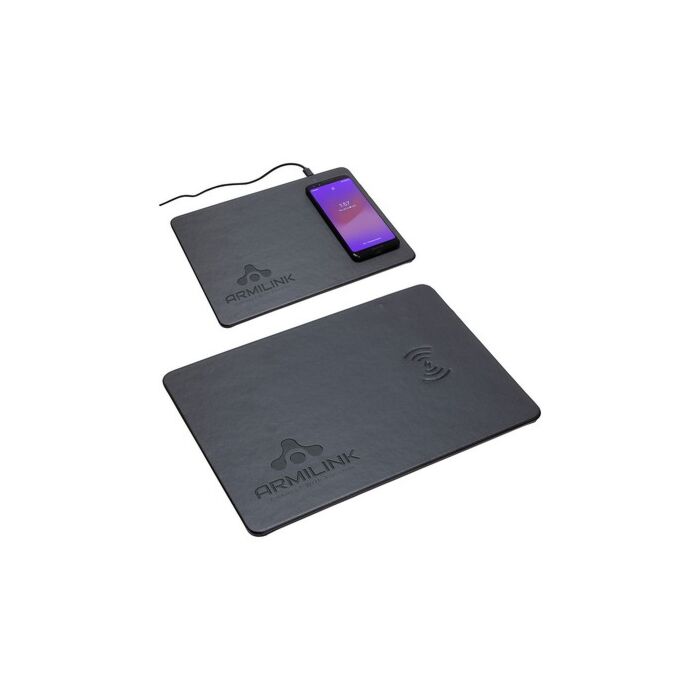
Enhance your workspace with the EAC-AM21 Avalon Mouse Pad featuring a built-in wireless charger. This innovative mouse pad offers a 5W Qi-equivalent compatible wireless charging surface, ensuring a seamless and convenient charging experience for your devices. Equipped with Foreign Object Detection functionality and an internal NTC temperature sensor, it protects the charger from overheating, providing both safety and reliability.
Crafted from soft-touch faux leatherette, the Avalon Mouse Pad not only functions effectively but also adds a touch of elegance to your desk. With an output of 5W and an input of 5V/2A, it efficiently charges your smartphone while you work. The package includes a Micro USB cable for easy setup. FCC certified and compliant with Prop 65 standards, this mouse pad combines practicality with stylish design.
Customize it with your logo and make it a perfect promotional item or corporate gift that is both functional and visually appealing!
Instant Quote
Ready after selected options
Plus applicable taxes
Plus applicable taxes. Quote updates if options change.
In stock
Pricing
30 - 99
Qty (Coloured) $23.60
100 - 199
Qty (Coloured) $21.98
200 - 499
Qty (Coloured) $21.37
500 - 999
Qty (Coloured) $20.78
1000 - and more
Qty (Coloured) $20.22
| Qty | 30 - 99 | 100 - 199 | 200 - 499 | 500 - 999 | 1000 - and more |
|---|---|---|---|---|---|
| Qty (Coloured) | |||||
| Price each | $23.60 | $21.98 | $21.37 | $20.78 | $20.22 |
| Setup charges | $80.00 | $80.00 | $80.00 | $80.00 | $80.00 |
Avalon Mouse Pad with Wireless Charger provides 5W Qi-equivalent compatible wireless charger mousepad with Foreign Object Detection functionality and internal NTC temperature sensor protects charger from overheating. Constructed of soft-touch faux leatherette. Output: 5W; Input: 5V/2A. Includes Micro USB cable. FCC certified. Complies with Prop 65. 10.375" L x 0.125" W x 7.5" H
| Vendor Code | 956 |
|---|
Artwork & File Preparation
Our goal is to use your art file to create the best print possible.
Contact [email protected] and we'll help answer your design questions.
How to Send Your Files
Send us your design as a vector file or a high-quality image file. We'll accept any of the file types below:
-

Adobe Illustrator Files .ai
- Illustrator files are vector - top quality.
- Please convert all fonts (type) to outline.
- Save the file as .EPS for maximum compatibility.
-

Adobe Photoshop Files .psd
- Keep file size below 6MB if possible.
- Photoshop files are best at 300 DPI or higher.
- Send the .psd file with Layers.
-

Corel Draw Files .cdr
- Corel Draw files are great!
- Be sure to convert all fonts (type) to outlines.
-

Image Files .jpg or .png
- Image files need to be high quality.
- Save the image as 300 DPI at actual print size.
-

PDF
- Save your file as a PDF to reduce file size.
- Only have a Word Document of your artwork? Send us a PDF and we'll help recreate the design.
Standard Pantone Colours
Please provide us with PMS# (solid coated). We can match an exact ink for an additional fee.
Bleed
Please always include at least 0.25" bleed on all sides.
Vector Files
What is a Vector file?
Vector files use lines, curves and shapes to create an image based on mathematical formulas.
Advantage of Vector:
Vector designs can be enlarged without getting pixelated or blurry.
Disadvantage of Vector:
Photographs and images usually can't be vectorized. Vector is best for shapes and text.
Which programs use Vector?
Adobe Illustrator and Corel Draw are two popular vector art programs.
Common Vector Problem: Missing Font
Solution 1:
If you are using a rare font, send us the font file (.ttf) with your vector design file (.ai .cdr).
Solution 2:
Alternatively, send us a copy of your file with all fonts converted to curves (outlined).
Be sure to save the original under a different name in case you want to edit the text later on.
Raster Files
What is a Raster file?
Raster files use pixels to display an image.
Advantage of Raster:
Raster files are good for photographs.
It can print well when you set your image size and quality high.
Disadvantage of Raster:
Raster files can look blurry when enlarged. Be sure to save at high quality from the start.
Which programs use Raster?
Adobe Photoshop is a popular raster program. Most images online are raster files as well.
Common Raster Problem: Low Quality Image
Solution 1: Send a Higher Quality Image
When creating a new document in Photoshop, select Image > Image Size and set the quality to 300 DPI. Note that enlarging a low quality jpg will not increase the quality.
Once you have a higher quality image, send it to us!
Solution 2: Hire our Designer
For $30 per half hour, one of our Graphic Designers will help re-create your design.
Need Design Help?
Need Help?
We recommend that you or your graphic designer supply us with art that is ready to print.
If you can't supply a high resolution file, our Art Department staff will help re-create at $30 per half an hour.
Contact [email protected] and we'll help answer your design questions.